
Tuesday, November 25, 2014

Monday, November 24, 2014
Picture orientation issues with iPhone 6s and Androids.
A friend of mine jumped into the Twitter-sphere, ready to tweet away at warp speed. He ran into this problem; when he tweeted a picture it was oriented wrong on Twitter but looked great on his phone. He was using an iPhone 6 and an Android, what can I say he likes toys. He tweeted four pictures, three from the Android and one from the iPhone. The iPhone one tweeted fine, the Android...not so much. After some research I found that this happens to both phones.
It seems with the iPhone 6, it happens a lot. The camera hangs and orientation issues occur when the camera is launched from the lock screen.
Try this
1. Make sure the screen is off.
2. Hold the iPhone 6 Plus in landscape position, home button to the left.
3. Press the home button and slide to go into the camera.
Note if you do that, the flash, HDR and front/back icons are sideways. If you take a picture then it will turn out rotated incorrectly. The phone did not recognize it's orientation when it went into camera mode.
If you turn the camera into portrait orientation and then back to landscape orientation the symbols adjust and the orientation ends up correct.
With the Android it was even easier, it was human error. All we did to correct this was to hold the phone in landscape mode when taking pictures, make sure the home button is on the right hand side and not in portrait mode.
It seems with the iPhone 6, it happens a lot. The camera hangs and orientation issues occur when the camera is launched from the lock screen.
Try this
1. Make sure the screen is off.
2. Hold the iPhone 6 Plus in landscape position, home button to the left.
3. Press the home button and slide to go into the camera.
Note if you do that, the flash, HDR and front/back icons are sideways. If you take a picture then it will turn out rotated incorrectly. The phone did not recognize it's orientation when it went into camera mode.
If you turn the camera into portrait orientation and then back to landscape orientation the symbols adjust and the orientation ends up correct.
With the Android it was even easier, it was human error. All we did to correct this was to hold the phone in landscape mode when taking pictures, make sure the home button is on the right hand side and not in portrait mode.
Friday, November 21, 2014
Build Your Own Adobe Creative Suite with Free and Cheap Software
Let me come clean first...my work computer is a box (Pentium 4/2.60 Ghz 2/1GB ram) and a very wide CRT monitor circa 2000. It is running Windows XP Pro/Version 2002/Service Pack 3 and sometimes sounds like a Soviet-built Lada, but it does and has everything I need. I guess that makes me a tad OCD, part Spartan and slightly a Luddite. Yes, this is it below...please be kind.

I have been using Macromedia Fireworks and Flash 8 for ages. A couple of years ago I purchased Adobe CS6 for my 2011 Windows 7 home computer. Now it may be time for me to get a new work computer and I am fretting that I will be losing all the applications I know like the familiar chair in my den. I was thinking about subscribing to Adobe Creative Cloud but for the price and what I do with it, I do not think it is worth it. So I went looking for alternatives.
I have two sources I would like to share (and thank them for publishing); Thorin Klosowski's October 2014 posting on this subject and a list published by North Carolina State University's Technology Department. If I'm giving NC State props,it must be a big deal...

GO TAR HEELS! :-)
I have been using Macromedia Fireworks and Flash 8 for ages. A couple of years ago I purchased Adobe CS6 for my 2011 Windows 7 home computer. Now it may be time for me to get a new work computer and I am fretting that I will be losing all the applications I know like the familiar chair in my den. I was thinking about subscribing to Adobe Creative Cloud but for the price and what I do with it, I do not think it is worth it. So I went looking for alternatives.
I have two sources I would like to share (and thank them for publishing); Thorin Klosowski's October 2014 posting on this subject and a list published by North Carolina State University's Technology Department. If I'm giving NC State props,it must be a big deal...
GO TAR HEELS! :-)
Monday, November 17, 2014
Monday, October 27, 2014
How to Get Refunds from iTunes & iTues App Store
Apple has made it much easier to "return" items purchased in the iTunes store for various reasons. I wanted to share an experience I had "returning" a song to Itunes. Yes it can be done!

If you are wondering why would anyone want refunds for purchases that they have made from the iTunes Apps store, consider the following situations:
- You ordered an HD movie from the iTunes store but after making the purchase, you realize that it would take several hours to download that massive file to your computer. You can stop the download but your credit card will still be charged.
- You have an iPhone but you accidentally bought an iPad version of some app which is obviously of no use to you.
- You purchased an explicit version of a song and you wanted the clean one, or visa versa.
- You wanted to buy a game but there were at least a dozen similar titles on the iTunes store. The one you finally bought is not the one you were originally looking for and you therefore want to return it to Apple.
- You purchased a song from iTunes store but there’s some problem with the audio format and it won’t play on your iPod or iPhone.
- You have two or more iTunes accounts and you purchased an iPhone App using the wrong iTunes account. You can’t transfer apps across accounts so a refund followed by re-purchase makes more sense.
- The 1-Click ordering system, that Apple licensed from Amazon, makes it easy for anyone to buy apps, songs, movies and games from the iTunes store with a single click but this can sometimes lead to accidental purchases especially when kids have access to your devices.

These are just some of the legitimate reasons why people may want to return their iTunes store purchases and request refunds from Apple.
The iTunes App store sales policy clearly says that you cannot cancel a purchase or receive a refund for a purchase but they are known to make exceptions if you have a valid reason.
For instance, I recently purchased the $1.29 explicit version of the Maroon 5 song, "Pay Phone" from the iTunes store but after listening to it, knew that I wanted the "clean/radio" version I know I'm such a prud. I use a lot of music in school settings and didn't want 20 f-bombs radiating from my speakers. I requested a refund from Apple and how they reversed the charges in less than 24 hours.
My next occurrence was when I was looking for the song "Wagon Wheel" but had no idea who did the version I heard and loved. When I searched doe the song on iTunes previewed a version done off the album "Magic of Folk". I like it but it was not the version I heard on the radio the day before. I did a search on the web an found the version I wanted was done by Darius Rucker. I bought that version to. A day later, I revived the order confirmation email and decided to see if I could get a refund.
My next occurrence was when I was looking for the song "Wagon Wheel" but had no idea who did the version I heard and loved. When I searched doe the song on iTunes previewed a version done off the album "Magic of Folk". I like it but it was not the version I heard on the radio the day before. I did a search on the web an found the version I wanted was done by Darius Rucker. I bought that version to. A day later, I revived the order confirmation email and decided to see if I could get a refund.
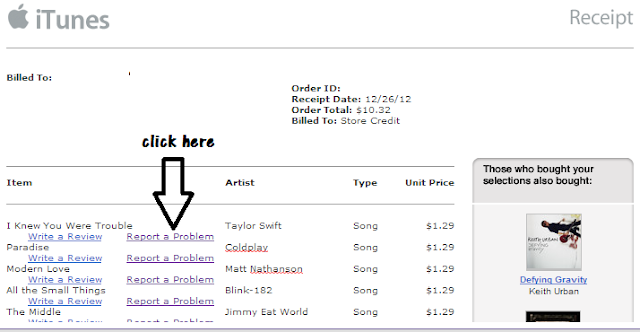
Step 1: Locate the email receipt for your iTunes Store purchase and click the “Report Problem” link next to the app/song that you would like to return. This intern will launch an Apple report a problem webpage and will ask you to log in using your iTunes log in.
Step 2: After logging in the next page you should see will be the media your purchased associated with the order confirmation email your received. Click on choose a problem from the drop down menu (I chose "meant to purchase a different item") and type an explanation in the text box underneath and click "submit" and voila I got my refund!! Easy peasy!

Step 2: After logging in the next page you should see will be the media your purchased associated with the order confirmation email your received. Click on choose a problem from the drop down menu (I chose "meant to purchase a different item") and type an explanation in the text box underneath and click "submit" and voila I got my refund!! Easy peasy!
If you have deleted the email invoice that Apple sent you after you completed the purchase, launch the iTunes program using this special link and you’ll see a list of all items that you’ve bought from the iTunes store. Open an order by clicking that little arrow next to the order date and then click “Report a problem” next to the app name.
If the above method fails, or if you don’t have iTunes on your computer, you can use this page to submit a refund request to Apple through any web browser.
Step 2: Click the Problem drop-down menu and choose an option that best describes your problem. If you have purchased an app accidentally, choose “I inadvertently purchased this application.” I chose "picked the wrong explicit/clean version of a song" and then begged for forgiveness and said I hated the explicit version.
You can expect a response from Apple in the next 24-48 hours. If the support rep is satisfied with your reasoning, he’ll probably reverse the charges. Please remember that you are not entitled to a refund under the iTunes Store Sales policy so if they deny your request for a refund, move on! I did luck out and get a credit.
Thursday, September 25, 2014
Sunday, August 3, 2014
Did Google Go Too Far? by Julia Bort of Business Insider
Continuing the series of post that have to do with Google and privacy.
Thursday, July 31, 2014
Saturday, July 12, 2014
Monday, June 23, 2014
Chrome Alone: Why Google’s OS Is Both Better and Worse Than Windows or Mac posted by Dan Tynan on Yahoo/Tech
This is a nice follow up to my April 2014 post, "My Weekend Chromecasting." Gives the pros and cons of the ChromeOS and Chrome Books.
Subscribe to:
Posts (Atom)