
Tuesday, March 14, 2023
Tuesday, November 22, 2022
Cannot open a MS Word Doc on a Mac because "user does not have access privileges".
Spanish teacher came down and said she could not open any of her MS Word files (our MS Office program installed on her MacBook). The error she kept getting was: “Word cannot open the document user does not have access privileges.”
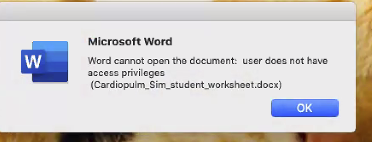
The first thing I did was to see if her permissions for a folder were correct, I check the Desktop folder.
In Finder→ Go Home (should see a house icon with the user’s name)
Right click on the Folder/Desktop “Get Info” In get info click on the drop down menu for “sharing and permissions” Make sure the user has “Read & Write” Access.
All this checked out OK.
Next I checked out the web and found that some fonts in Office cause the error because Mac’s OS thinks it’s a virus. See below.
Cause
A lot of MacOS users are receiving the Grant File Access error when trying to open various file types in Office 2016. The issue typically appears when trying to open Word files, but some users have also reported the issue with Excel and Powerpoint files.
The Grant Access error is caused by the updated Apple sandboxing rules. Apple now uses sandboxing to limit various actions by tying them to a specific location. Application sandboxing is very effective in preventing viruses or other malware from affecting OS files. Following the new guidelines, every application that uses custom fonts must ensure that the fonts stay exclusive to that particular application. Apple no longer allows an application to install fonts for system-wide use.
In the event that a system-wide font gets altered along the way, it will be regarded as a security violation and will be replaced at the next update. Starting with Office 2016, Microsoft had to comply with Apple’s rules in order to be able to sell the Office suite in the App store. Microsoft provides a set of fonts specifically for their software, which will get installed in a different location.
However, most 3rd party font utilities have not been fully updated to work with the new sandbox rules and will cause conflicts seen as security violations by MacOS. It has been confirmed that 3rd party font management apps like Suitcase, Linotype Font Explorer, Extense, or FontExplorer X are the main culprits causing the Grant Access error with the Office 2016 suite. As of now, FontBook is the only font management utility that is specifically designed to work with Apple’s new security system.
Resolution
Clearing the Mac OS Font Caches via Terminal
Some affected users that have been encountering this issue with macOS 10.13 High Sierra or above have reported that the issue has been resolved after they cleaned the font caches by using the Terminal. After doing this and restarting their Mac, most affected users have reported that the Grant access error has stopped occurring.
If this scenario is applicable to your particular scenario, here’s what you need to do:
1. Close all applications that are currently opened. To do this, press Command + Option + Escape to open the Force Quit Application window. Then, select each opened app and click on the Force Quit button.
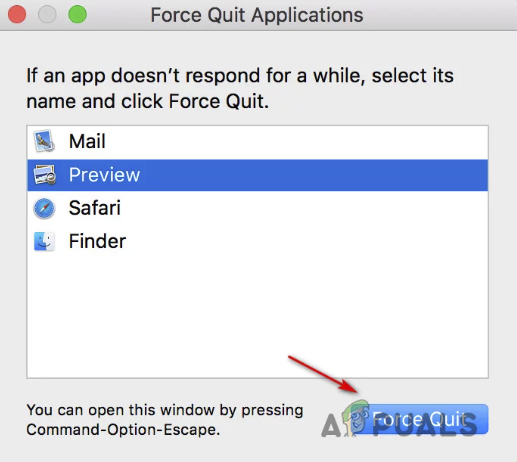
Force Quit all opened apps
Note: This step is very important. Failing to do so will result in an error if an application that is using the font caches is currently opened.
2. Once every application is closed, press Command + Shift + U to open the Utility folder and click on Terminal to start it.
3. Type the following command and press Return to run it:
sudo atsutil databases -remove
4. You will be asked to provide your account password at the prompt. Do so and press Return once again to grant the necessary permissions.
5. When the process is complete, type exit to end your command line session, then go to File > Quit to exit the Terminal app.
6. Restart your Macintosh and the issue should be resolved at the next system startup.
Thursday, November 3, 2022
Issues with Mac OSVentura and printing pdfs
Don't you just love it when Apple does something with an update and ends up leaving the world scrambling for a fix with no suggestions from them??
Don't get me wrong, there's a lot of stuff (awesome tech support, tools, etc.) that make my life way easier but this one got my head scratching along with others on the planet.
In October of 2022 Mac came out with OS13 Ventura and the app Preview no longer printed .ps (post script) or .eps (encapsulated post script) files. I had one machine I had to update to Ventura so I could install Apple Classroom on it (Classroom needs OS 11.3 or higher). Once I updated to Ventura the Mac lost its ability to print .pdf files in Preview.
Preview in Ventura Drops Support for PostScript and Encapsulated PostScript Files
Konica suggested removing the printers from System Preferences (System Setting in Ventura) and then removing any traces of the software by going to: Finder→Go→Computer–>Macintosh HD→Library→Printers and removing all the folders of the brand of the printer/copier that's not working. Next download and install the most current driver for that printer/copier.
Next add the printers in System Preferences/System Settings.
Open a .pdf in Preview and see if it works, at first mine did not, after which I downloaded Foxit Reader from the App Store…made that the default program for all .pdfs and lo and behold I was able to print .pdfs again. The funny thing is that I opened up a .pdf in Preview and was able to print from that as well! Who knew?!?
Here are a list of the latest OS.
Ventura / OS 13 / Fall 2022
Monterey / OS 12 / Fall 2021
Big Sur / OS 11 / Fall 2020
Catalina / OS 10.15 / Fall 2019
Friday, February 18, 2022
Wednesday, January 19, 2022
How to order your free 4 COVID rapid test from the Federal Government.
Use the link below provided by the United States Postal Service, FYI some shared addresses (like apartment buildings) have had issues where one person say (1 Smith Way Apt 1) ordered the test first and therefore everyone after living on 1 Smith Way request for test would be rejected. The feds say they are working to fix the problem.
https://special.usps.com/testkits
Tuesday, January 11, 2022
Macs and OS compatibility.
Monterey compatibility October 2021.
• MacBook models from early 2016 or later
• MacBook Air models from early 2015 or later
• MacBook Pro models from early 2015 or later
• Mac mini models from 2014 or later
• iMac from 2015 or later
• iMac Pro (2017 and later)
• Mac Pro models from late 2013 and later
Big Sur compatibility
Big Sur was the version of macOS that arrived on some Macs in November 2020. Here's a list of the Macs that can run macOS Big Sur:
• MacBook models from early 2015 or later
• MacBook Air models from 2013 or later
• MacBook Pro models from 2013 or later
• Mac mini models from 2014 or later
• iMac from 2014 or later
• iMac Pro (all models)
• Mac Pro models from 2013 and 2019
Catalina compatibility
Catalina arrived in October 2019 and can run on the following Macs:
• MacBook (2015 to 2017)
• MacBook Air (Mid-2012 to 2019)
• MacBook Pro (Mid-2012 to 2019)
• Mac mini (Late 2012 to late-2018)
• iMac (Late 2012 to 2019)
• iMac Pro (all models)
• Mac Pro models from 2013
Mojave compatibility
Mojave arrived in September 2018 and can run on the following Macs:
• MacBook (Early 2015 to 2017)
• MacBook Air (Mid 2012 to 2017, because it's the same as 2015 model)
• MacBook Pro (Mid 2012 to 2018)
• Mac mini (Late 2012 to late-2018)
• iMac (Late 2012 to mid-2017)
• iMac Pro (all models)
• Mac Pro (Late 2013, plus mid-2010 and mid-2012 models with recommended Metal-capable GPU)
High Sierra compatibility
High Sierra arrived in September 2017 and can run on the following Macs:
• MacBook (Late 2009 to 2017)
• MacBook Air (Late 2010 to 2017, which is same as 2015 model)
• MacBook Pro (Mid 2010 to 2017)
• Mac mini (Mid 2010 to 2014)
• iMac (Late 2009 to mid-2017)
• Mac Pro (Mid 2010 and 2013)
Sierra compatibility
Sierra arrived in September 2016 and can run on the following Macs:
• MacBook (Late 2009 to 2017)
• MacBook Air (Late 2010 to 2017, which is same as 2015 model)
• MacBook Pro (Mid 2010 to 2015)
• Mac mini (Mid 2010 to 2014)
• iMac (Late 2009 to 2015)
• Mac Pro (Mid 2010 and 2013)
El Capitan compatibility
El Capitan arrived in September 2015 and can run on the following Macs:
• MacBook (Early 2015 to 2017)
• MacBook (Late 2008 to 2010)
• MacBook Air (Late 2008 to early 2015)
• MacBook Pro (Mid/Late 2007 to early 2015)
• Mac mini (Early 2009 to 2014)
• iMac (Mid 2007 to mid-2015)
• Mac Pro (2008, 2010, 2013)
Yosemite compatibility
Yosemite arrived in October 2014 and can run on the following Macs:
• MacBook (Late 2008 to 2010)
• MacBook Air (Late 2008 to mid 2013)
• MacBook Pro (13" Mid-2009 to mid 2014)
• MacBook Pro (15" Mid/Late 2007 to mid 2014)
• MacBook Pro (17" Late 2007 to 2011)
• Mac mini (Early 2009 to 2012)
• iMac (Mid-2007 to mid-2014)
• Mac Pro (2008 and 2010)
Mavericks compatibility
Mavericks arrived in October 2013 and can run on the following Macs:
• MacBook (Late 2008 to 2010)
• MacBook Air (Late 2008 to mid 2013)
• MacBook Pro (Mid 2007 to early 2013)
• Xserve (Early 2009)
• Mac mini (Early 2009 to 2012)
• iMac (Mid 2007 to early 2013)
• Mac Pro (Early 2008 and 2010)
Mountain Lion compatibility
Mountain Lion, the last of the 'cat' versions of macOS launched in July 2012 and can run on the following Macs:
MacBook (Late 2008 to 2010)
• MacBook Air (Late 2008 to mid 2012)
• MacBook Pro (Mid/Late 2007 to mid-2012)
• Mac mini (Early 2009 to 2011)
• iMac (Mid-2007 to 2011)
• Mac Pro (Early 2008 and 2010)
Friday, April 30, 2021
Gale Database access that use to work without any login now is asking for one. What gives?
My school is very lucky that we access some of Gale's databases via our membership in our State Library system. We have been able to access them without any logins, then when we went remote/hybrid, some instances occurred on devices that prompted the user to login with their member name and password. Now, if you had a library card from the local library that worked and gave you access but if you did not have one you were out of luck. When I started to look into this problem, it did not just occur on certain types of devices. It happen on ipads, macbooks...mostly Apple stuff with the user using the Safari browser and it wasn't happening to a lot of students, just a handful. I don't know why I though of this but I went into (i.e. on iPad) Settings, Safari and scrolled down until I saw Location. Then the lightbulb when off! On the devices that were asking for a login the setting for Location Access on All Websites was set to Deny. When I changed it to Ask or Allow and tried the database again, they got in and was not requires to provide any name or password. So that is my theory and I'm sticking with it!.
Friday, January 29, 2021
Savvas Realize and issue with iPads (video plays but no sound).

This post deals with an issue my school had with Savvas Realize. Our students would log in on an iPad using Google Chrome or Safari. They could navigate through the module (Elevate Science Module). Choose a chapter (Systems, Reproduction, and Growth: Reproduction and Growth), choose a lesson (Lesson 1: Patterns of Reproduction), click on a video (Patterns of Reproduction). On a Macbook, PC, Chromebook the video worked fine, but on a iOS device (iPad or iPhone) the video played but had no sound with it.
The teacher contacted Savvas support and provided all the info they asked for; what device was she using, current iOS, size of storage, memory, bla, bla, bla. They sent her link to show her how to: clear the cache of the iPad, double check to see if the iPad was compatible (it was), bla, bla, bla. After a couple of back and forths, they informed the teacher that they had "elevated her case status and were looking into it. After all this she came to me with the issue.
Can't lie, I was stumped at first. I was able to replicate everything mentioned above but still no solution, then it hit me like a bolt out of the blue. A number of years ago our Science Department was having problems accessing websites with flash videos on the iPads, Apple has never support this on the iPad. I did some research and found another browser (Puffin Browser), that allowed Flash to work on the iPad.
Well I downloaded the Puffin Browser on the iPAD and LO AND BEHOLD the video worked, sound and all.
I wish I could give you the exact details of why but at this stage of the game, I'm just glad it works.
I find it hard to believe that a multi-million dollar company like Savvas (formerly Pearson Learning) could not figure out why it was not working especially in today's world of remote leaning. I was informed by the teacher that when Savvas came out to train our Science Department, she asked if there were any know issues with iPads-since we are 1:1. The response was "No. You are still using iPAds? Everyone else is using Chromebooks". YIKES!!! Let's just say I'm not impressed. That being said, today will be my last day working at Georgetown Middle/High School. I will be working at Savvas next week as a consultant---KIDDING!! :-)

Tuesday, October 13, 2020
IpadOS and iOS 14, to update or not to update, that is the question!
It's that most wonderful time of the year again!! iOS Update Season! OH JOY!! I can hardly contain myself! Let me state my background for updates, I am a Luddite. My PC is running Windows 3.1!! KIDDING. Honestly, I do become gun-shy about updates. I know that they improve the security, the experience, etc, yet I have seen so many times that my staff has done it on older machines and all heck breaks loose: Important apps no longer work, the device chugs along at the speed of sail. So I have complied some info on this subject.
Why I should not update to iOS/iPadOS 14 yet, as of Sept 16, 2020, from David Price, Editor of Macworld UK. “There are few downsides to upgrading, and I happily allow them to install automatically when available. Occasionally, however, it's worth advising caution, and turning off auto updates for a short while. And it looks like iOS 14 comes under that category.
Apple didn't manage to spring many surprises at its 15 September Time Flies event, but its announcement that iOS 14 would roll out the very next day gave a few app developers a shock. Normally there's far more notice (usually around a week) between the announcement and the rollout; by Apple's standards this was sudden. And the general feeling among those app developers is not entirely positive. A lot of them have since expressed their concerns on social media, warning that the software isn't ready - by which they don't necessarily mean iOS 14 itself is faulty, but that a worrying number of apps don't yet work well with it. They simply haven't had enough time to sort out all the issues.” (https://www.macworld.co.uk/news/iosapps/dont-install-ios-14-3795312/)
Here's a full list of compatible iPadOS 14 devices:
- iPad Air 2 (2014)
- iPad Air (2019)
- iPad mini 4 (2015)
- iPad mini (2019)
- iPad (2017, 2018, 2019)
- iPad Pro 9.7in (2016)
- iPad Pro 10.5in (2017)
- iPad Pro 11in (2018, 2020)
- iPad Pro 12.9in (2015, 2017, 2018, 2020)
Will my Apple TV run tvOS 14?
As with tvOS 13, tvOS 14 will be available on all versions of Apple TV that support an App Store. Currently, that's the Apple TV HD (sometimes referred to the 4th gen model) and the Apple TV 4K models, as well as any new Apple TV that gets released.
Here's a list of iOS 14-compatible iPhones:
- iPhone 6s & 6s Plus
- iPhone SE (2016)
- iPhone 7 & 7 Plus
- iPhone 8 & 8 Plus
- iPhone X
- iPhone XR
- iPhone XS & XS Max
- iPhone 11
- iPhone 11 Pro & 11 Pro Max
- iPhone SE (2020)
- ...plus obviously the iPhone 12, 12 Max, 12 Pro and 12 Pro Max will all come with iOS 14 preinstalled.
Friday, May 8, 2020
We made $800 in our Disney movie fundraiser, but Disney billed us $250 because we showed it with a license.
 In the February 3, 2020 edition of the Sacramento Bee that an elementary school is California had a fundraiser by showing the Disney Movie "The Lion King" and then promptly received a bill because they forgot to purchase a license (for $250) to show it. A parent of a student at the school and a member of the Berkeley City Council, blasted Disney in a Twitter thread over the demand, stating that she could not believe that Disney went after a elementary school that struggles to pay it teachers. Disney backed off the threat and realized eating a $250 bill was waaaay smarter than the public relation nightmare it would of have by pursing it.
I work at a Middle/High School (grades 7-12) in Massachusetts and like Laocoön warning the Trojans about the Trojan Horse, I have warned people about showing movies for a non-educational purpose but it has always fell on deaf ears because really who has actually ever gotten "bagged" for this deed? Well this school did, for good or bad it is copyright infringement.
I have had the head of the sports boosters tell me that it was totally legal to charge people admission (as a fundraiser) to watch the movie "Air Bud". She kept coming back saying it fell under "Fair Use", and no it doesn't. Just because you are using it in an education setting, notice I said educational setting not EDUCATIONAL PURPOSE, that makes everything OK. It doesn't.
MUSIC and Copyright
Another cause of my angst was the use of copyrighted music without permission for a non-
Educational Purpose. I've heard everything: "I'm a teacher so it's OK", "As long as it is instrumental music it's OK"...somebody hand me a Tums. In 2000, I started an internet radio station for our school and I wanted to play music, and since I worked at a real radio station as well I knew that involved buying a license. I was familiar with BMI and ASCAP, the two major licensing entities. This time, with everybody and their grandmother posting videos of support, tributes, etc., I wanted to find out how to keep my staff from going to jail...kidding.
ASACP was very helpful. They said that they major licensing entities worked a deal with Facebook, You Tube…those companies actually paid for the license fees. So ASCAP said as song the belong in the ACE Repertory you can post. Check out the Repertory. https://www.ascap.com/repertory
But it gets EVEN BETTER!!!
Facebook Videos Now Allowed To Feature Copyrighted Music
As of June 2018, Facebook users will no longer have to worry about their videos being taken down because they contain licensed music. Previously, Facebook blocked videos that included copyrighted music. With the new rules, when users upload Facebook videos containing music, they will be informed if the included song is allowed through the licensing deals acquired by the social network. If not, the video will be muted, unless the uploader submits a dispute. The label that holds the copyright may then approve the usage of the song in the video through the Rights Manager tool of Facebook.
Facebook will reportedly provide compensation to labels and artists whose music is used in videos uploaded to the platform. However, the company did not disclose the rates, and whether the compensation would be computed based on the number of uploads or on video hits.
HURRAH!!!
When questions arise about Copyright, I use the following questions as a Framework for Copyright Analysis.
- Is the work protected by Copyright?
- (if #1 is yes) Is their a specific exception in Copyright Law that covers my use?
- (if #1 is yes) Is there a license that covers my use?
- Is my use covered by Fair Use?
- The Teach Act (online classrooms)
- In Class performances (classroom exception): Section 110(1): Classroom use.
- Library exception: Section 108 Library & Archives
- First Sale
- Fair Use (see below)
- the purpose and character of the use, including whether such use is of commercial nature or is for nonprofit educational purposes;
- the nature of the copyrighted work;
- the amount and substantiality of the portion used in relation to the copyrighted work as a whole; and
- the effect of the use upon the potential market for or value of the copyrighted work.